Search

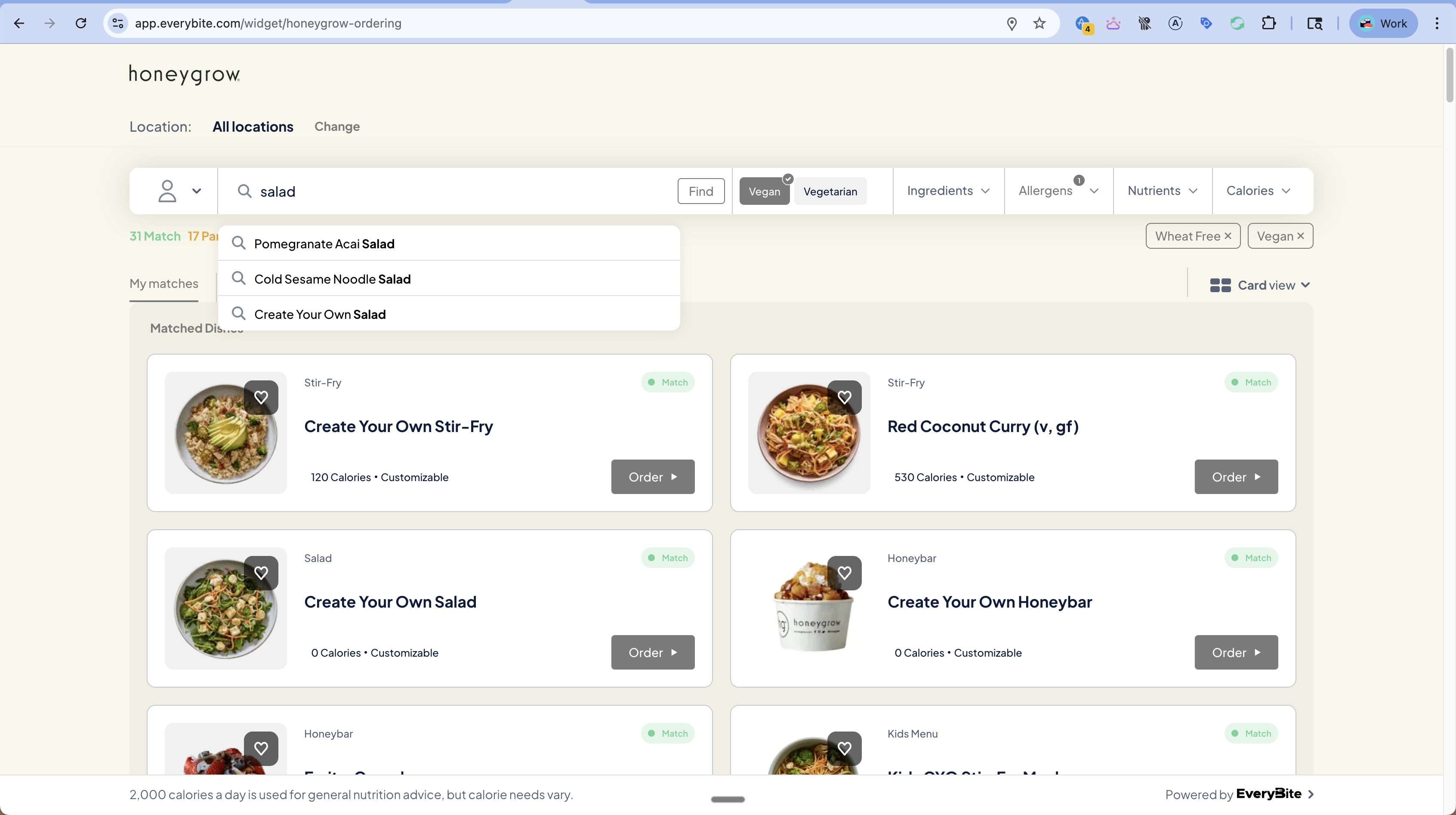
The Search function lets diners find dishes by keyword with real-time autocomplete suggestions.
query SearchDishes($term: String!) {
  dishes(
    menuKey: "your_key",
    filters: {
      term: $term
    }
  ) {
    results {
      dish {
        id
        name
        category { name }
        calories
      }
      matchStatus
    }
  }
}

Autocomplete

For search-as-you-type functionality, use the autocomplete query:
query Autocomplete($term: String!) {
  searchSuggestions(
    menuKey: "your_key",
    term: $term,
    limit: 5
  ) {
    suggestions {
      text           # Suggestion text
      highlightedText # With <mark> tags around matches
      dishId         # If suggestion is a specific dish
      category       # If suggestion is a category
    }
  }
}

Example Response

For search term “sal”:
{
  "data": {
    "searchSuggestions": {
      "suggestions": [
        {
          "text": "Pomegranate Acai Salad",
          "highlightedText": "Pomegranate Acai <mark>Sal</mark>ad",
          "dishId": "dish_123",
          "category": null
        },
        {
          "text": "Create Your Own Salad",
          "highlightedText": "Create Your Own <mark>Sal</mark>ad",
          "dishId": "dish_456",
          "category": null
        },
        {
          "text": "Cold Sesame Noodle Salad",
          "highlightedText": "Cold Sesame Noodle <mark>Sal</mark>ad",
          "dishId": "dish_789",
          "category": null
        }
      ]
    }
  }
}

Search with Filters

Combine keyword search with dietary filters:
query FilteredSearch($term: String!) {
  dishes(
    menuKey: "your_key",
    filters: {
      term: $term,
      diets: [Vegan],
      excludeAllergens: [Dairy]
    },
    dinerPreferences: {
      diets: [Vegan],
      excludeAllergens: [Dairy]
    }
  ) {
    results {
      dish { name }
      matchStatus
    }
    counts {
      matches
      partialMatches
    }
  }
}

UI Pattern

Search Autocomplete

Implementation

const [term, setTerm] = useState('');
const [suggestions, setSuggestions] = useState([]);

// Debounce search input
useEffect(() => {
  const timer = setTimeout(async () => {
    if (term.length >= 2) {
      const { data } = await client.query({
        query: AUTOCOMPLETE_QUERY,
        variables: { term }
      });
      setSuggestions(data.searchSuggestions.suggestions);
    }
  }, 200);

  return () => clearTimeout(timer);
}, [term]);

return (
  <div className="search-container">
    <input
      type="text"
      placeholder="I'm looking for..."
      value={term}
      onChange={(e) => setTerm(e.target.value)}
    />
    {suggestions.length > 0 && (
      <ul className="suggestions">
        {suggestions.map(s => (
          <li
            key={s.dishId || s.text}
            dangerouslySetInnerHTML={{ __html: s.highlightedText }}
            onClick={() => selectSuggestion(s)}
          />
        ))}
      </ul>
    )}
  </div>
);

Search Results Tab

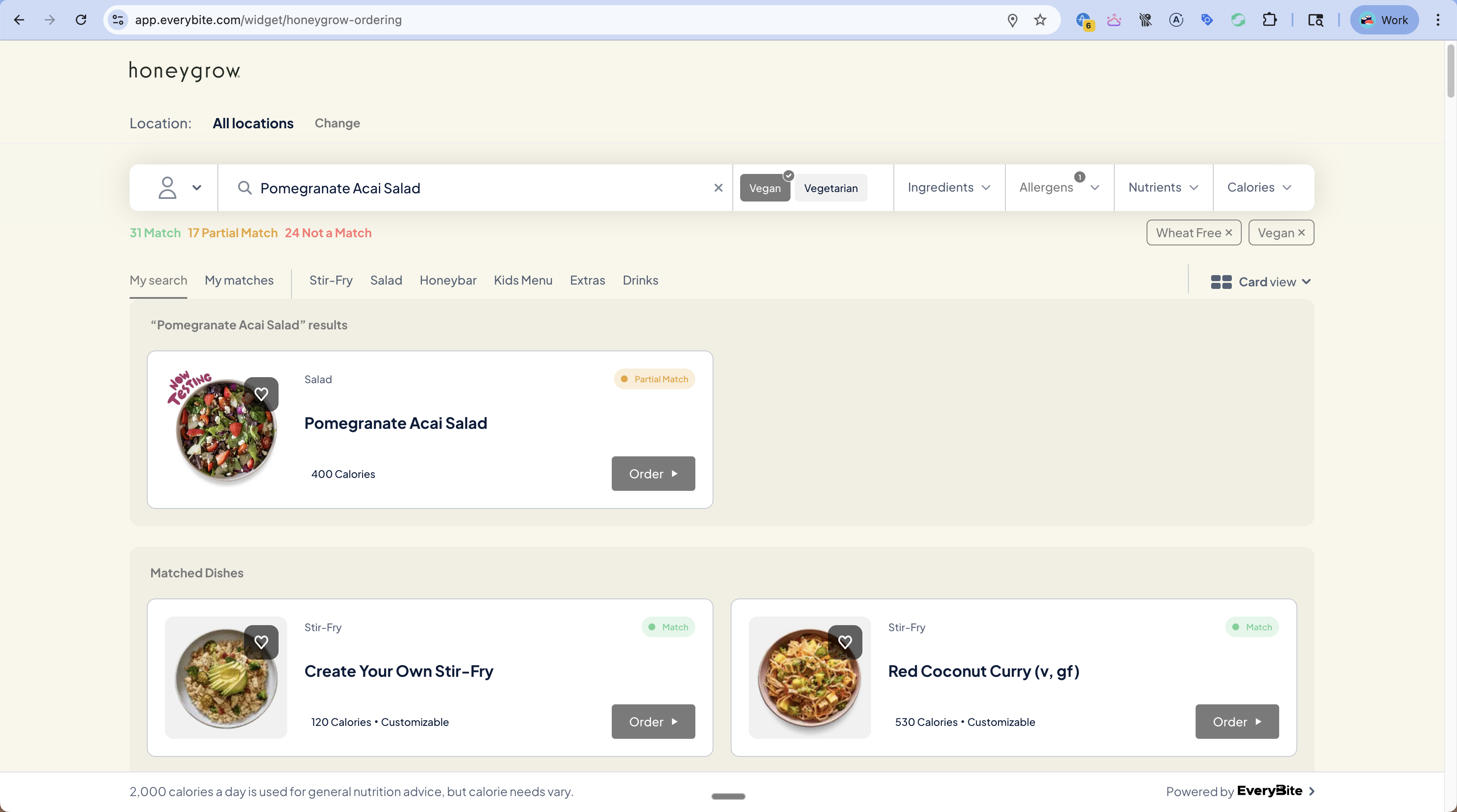
After searching, results appear in a “My search” tab:
Search Results
The search results show:
  • The searched dish (may be a Partial Match)
  • “Matched Dishes” section with other compatible dishes
query SearchResults($term: String!) {
  searchResults(
    menuKey: "your_key",
    term: $term,
    dinerPreferences: { ... }
  ) {
    # The specific dish searched for
    searchedDish {
      dish { name }
      matchStatus
    }

    # Other dishes that match preferences
    matchedDishes {
      dish { name }
      matchStatus
    }
  }
}

Best Practices

Wait 150-200ms after the user stops typing before making API calls. This reduces unnecessary requests.
Require at least 2-3 characters before showing suggestions. Single letters produce too many results.
Use the highlightedText field to show users why each suggestion matched their query.
Include calories and category in suggestion items to help users identify the right dish.
Show a friendly message when no dishes match: “No dishes found for ‘xyz’. Try a different search.”