Nutrition Calculator

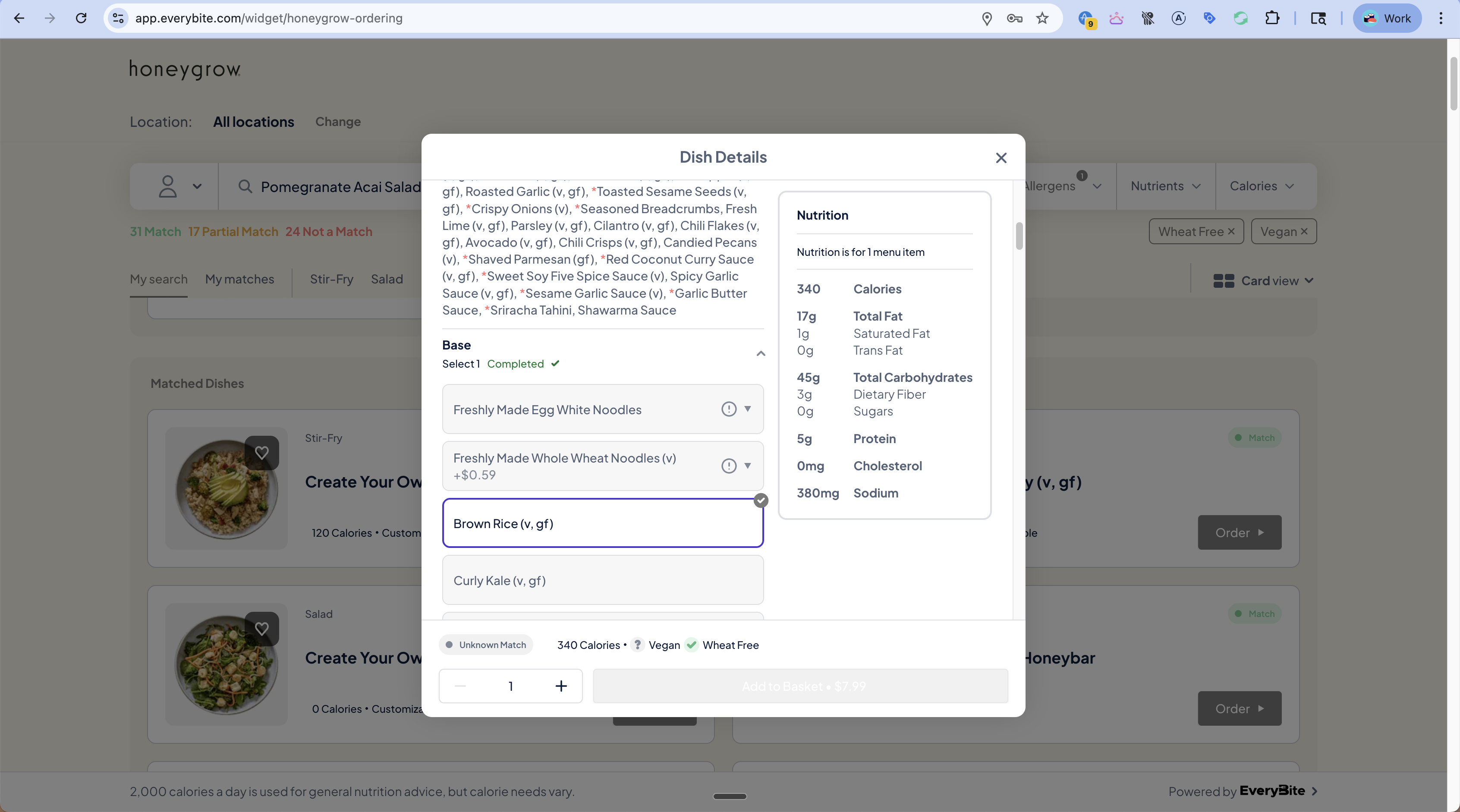
The Nutrition Calculator computes real-time nutrition, allergens, and match status for customizable dishes as the diner makes selections.

Use Case

For “Build Your Own” dishes like stir-fries or salads, nutrition depends on what the diner chooses:
  • Base: Brown Rice vs Egg Noodles vs Kale
  • Protein: Chicken vs Tofu vs Shrimp
  • Sauce: Coconut Curry vs Garlic Butter vs Sesame
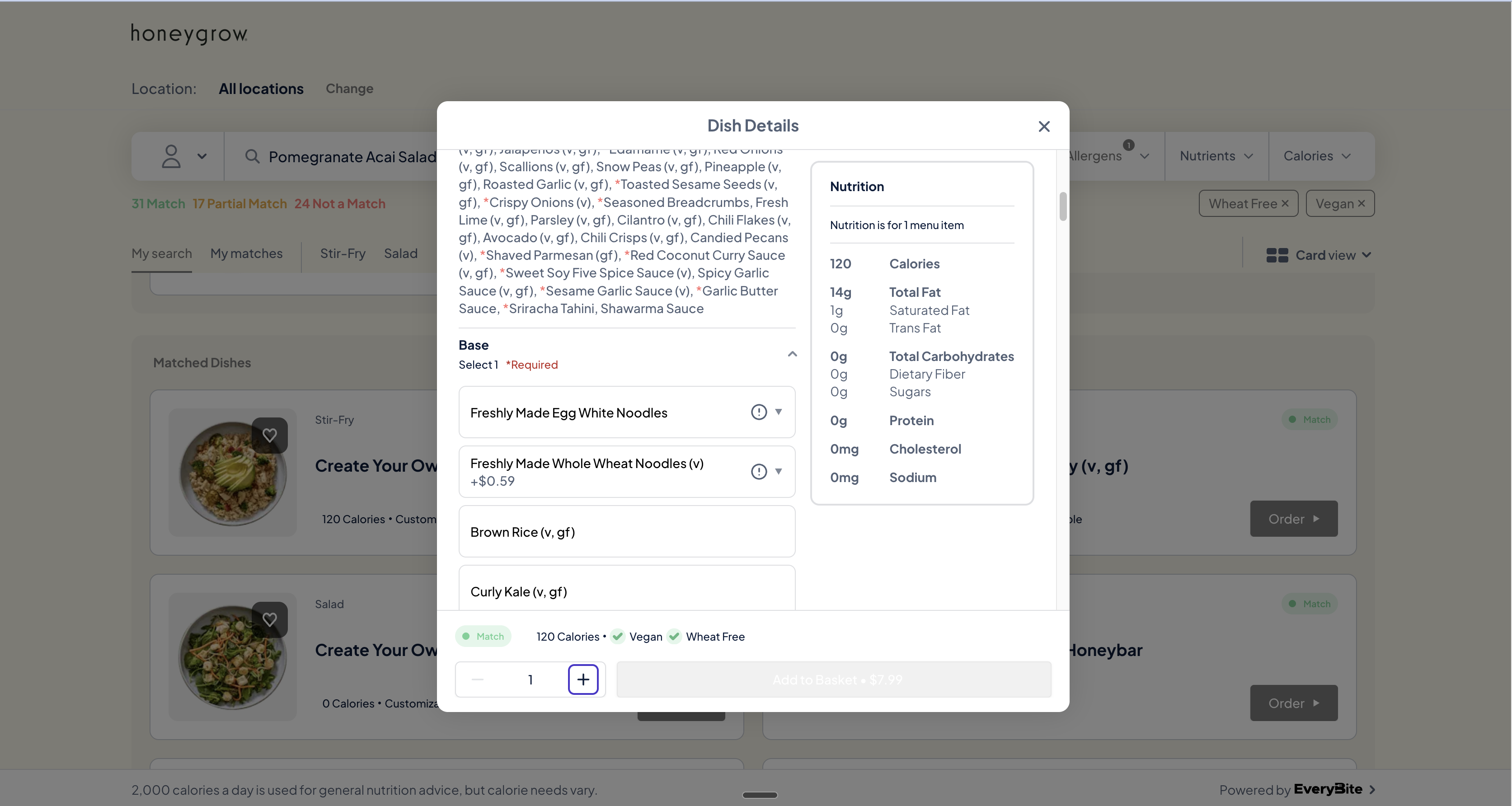
As they select options, nutrition, allergens, and diet compatibility update instantly.
Customization Flow

Getting Customization Options

First, fetch the dish’s customization options:
query GetCustomizableD($dishId: ID!) {
  dish(menuKey: "your_key", id: $dishId) {
    id
    name
    isCustomizable
    customizationOptions {
      id
      name           # "Base", "Protein", "Sauce", etc.
      required       # Must select one?
      minSelections
      maxSelections
      options {
        id
        name         # "Brown Rice", "Egg Noodles"
        calories
        price        # Additional cost (if any)
        allergens { type, displayName }
        diets { type }
      }
    }
  }
}

Example Response

{
  "dish": {
    "name": "Create Your Own Stir-Fry",
    "isCustomizable": true,
    "customizationOptions": [
      {
        "id": "base",
        "name": "Base",
        "required": true,
        "minSelections": 1,
        "maxSelections": 1,
        "options": [
          {
            "id": "brown_rice",
            "name": "Brown Rice (v, gf)",
            "calories": 120,
            "price": 0,
            "allergens": [],
            "diets": [{ "type": "Vegan" }, { "type": "GlutenFree" }]
          },
          {
            "id": "egg_noodles",
            "name": "Freshly Made Egg White Noodles",
            "calories": 180,
            "price": 0,
            "allergens": [{ "type": "Egg", "displayName": "Egg" }],
            "diets": [{ "type": "Vegetarian" }]
          },
          {
            "id": "wheat_noodles",
            "name": "Whole Wheat Noodles (v)",
            "calories": 200,
            "price": 0.59,
            "allergens": [{ "type": "Wheat", "displayName": "Wheat" }],
            "diets": [{ "type": "Vegan" }]
          }
        ]
      }
    ]
  }
}

Calculating Nutrition

As the diner makes selections, call the nutrition calculator:
query CalculateNutrition(
  $dishId: ID!,
  $selections: [SelectionInput!]!,
  $dinerPreferences: DinerPreferencesInput
) {
  calculateNutrition(
    menuKey: "your_key",
    dishId: $dishId,
    selections: $selections,
    dinerPreferences: $dinerPreferences
  ) {
    # Updated nutrition
    nutrition {
      calories
      protein
      carbohydrates
      fatTotal
      fatSaturated
      sodium
      dietaryFiber
      sugar
    }

    # Updated allergens
    allergens {
      type
      displayName
    }

    # Updated diet compatibility
    diets {
      type
      displayName
    }

    # Match status based on current selections
    matchStatus
    matchDetails {
      dietCompatibility
      allergenConflicts
    }
  }
}

Selection Input

input SelectionInput {
  groupId: ID!      # "base", "protein", etc.
  optionIds: [ID!]! # ["brown_rice"]
}

Real-Time Updates

Nutrition Update
As the diner changes selections:
SelectionCaloriesMatch Status
(none)120Unknown
Brown Rice120Match (Vegan, GF)
Egg Noodles180Partial Match (has Egg)
+ Shrimp340Not a Match (Shellfish)

Implementation Pattern

function DishCustomizer({ dish, dinerPreferences }) {
  const [selections, setSelections] = useState({});
  const [nutrition, setNutrition] = useState(null);

  // Recalculate when selections change
  useEffect(() => {
    const selectionInputs = Object.entries(selections).map(
      ([groupId, optionIds]) => ({ groupId, optionIds })
    );

    if (selectionInputs.length > 0) {
      calculateNutrition({
        variables: {
          dishId: dish.id,
          selections: selectionInputs,
          dinerPreferences
        }
      }).then(({ data }) => {
        setNutrition(data.calculateNutrition);
      });
    }
  }, [selections]);

  return (
    <div className="customizer">
      {/* Customization options */}
      {dish.customizationOptions.map(group => (
        <CustomizationGroup
          key={group.id}
          group={group}
          selected={selections[group.id] || []}
          onChange={(optionIds) => {
            setSelections(prev => ({
              ...prev,
              [group.id]: optionIds
            }));
          }}
        />
      ))}

      {/* Live nutrition panel */}
      {nutrition && (
        <NutritionPanel
          nutrition={nutrition.nutrition}
          matchStatus={nutrition.matchStatus}
          allergens={nutrition.allergens}
          diets={nutrition.diets}
        />
      )}
    </div>
  );
}

Match Status Updates

The calculator returns updated match status based on selections:
<div className="match-indicator">
  {nutrition.matchStatus === 'MATCH' && (
    <span className="match">
      <CheckIcon /> Match
      <span className="diets">
        {nutrition.diets.map(d => d.displayName).join(', ')}
      </span>
    </span>
  )}

  {nutrition.matchStatus === 'PARTIAL_MATCH' && (
    <span className="partial">
      <AlertIcon /> Partial Match
      <span className="conflicts">
        Contains: {nutrition.allergens.map(a => a.displayName).join(', ')}
      </span>
    </span>
  )}

  {nutrition.matchStatus === 'UNKNOWN' && (
    <span className="unknown">
      <QuestionIcon /> Match depends on selections
    </span>
  )}
</div>

Add to Cart

Include selections when adding to cart:
mutation AddToCart(
  $dishId: ID!,
  $selections: [SelectionInput!]!,
  $quantity: Int!
) {
  addToCart(
    dishId: $dishId,
    selections: $selections,
    quantity: $quantity
  ) {
    cart {
      items {
        dish { name }
        selections { groupName, optionName }
        nutrition { calories }
        price
      }
      subtotal
    }
  }
}

Best Practices

If multiple selections can change rapidly, debounce the calculation call to avoid excessive API requests.
Display a subtle loading indicator on the nutrition panel while recalculating.
When nutrition values change, briefly highlight them to draw attention to the update.
Check that all required groups have selections before allowing “Add to Cart”.
If a selection adds an allergen that conflicts with preferences, show a clear warning.