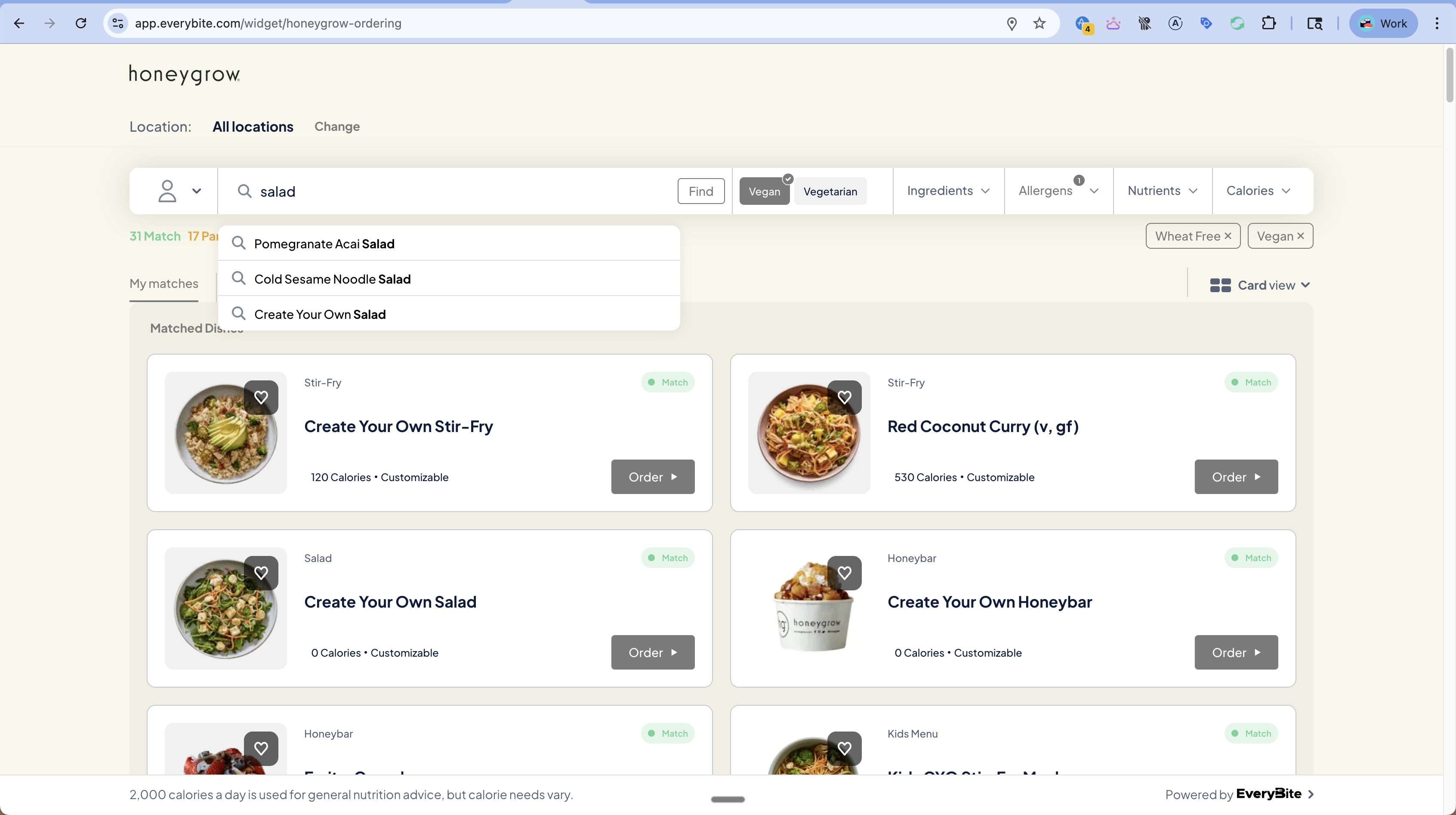
Filter

The Filter function lets you query dishes that match specific dietary, allergen, and nutritional criteria.

Filter Options

Get Available Filters

Before building your filter UI, discover what’s available:
query GetFilterOptions {
  filterOptions(menuKey: "your_key") {
    diets {
      type
      displayName
      isEnabled
    }
    allergens {
      type
      displayName
      icon
      isEnabled
    }
    nutrients {
      type
      displayName
      unit
      defaultMin
      defaultMax
      recommendedMin
      recommendedMax
    }
    categories {
      id
      name
      dishCount
    }
  }
}

Filtering Dishes

By Diet

query VeganDishes {
  dishes(
    menuKey: "your_key",
    filters: {
      diets: [Vegan]
    }
  ) {
    results {
      dish { name }
    }
  }
}
Multiple diets are AND-ed (dish must be compatible with all):
filters: {
  diets: [Vegan, GlutenFree]  # Must be BOTH vegan AND gluten-free
}

By Allergen Exclusion

query DairyFreeDishes {
  dishes(
    menuKey: "your_key",
    filters: {
      excludeAllergens: [Dairy, Egg, Peanut]
    }
  ) {
    results {
      dish { name }
    }
  }
}

By Calories

query LowCalorieDishes {
  dishes(
    menuKey: "your_key",
    filters: {
      calorieRange: { min: 200, max: 500 }
    }
  ) {
    results {
      dish { name, calories }
    }
  }
}

By Nutrients

query HighProteinLowCarb {
  dishes(
    menuKey: "your_key",
    filters: {
      nutrientTargets: {
        protein: { min: 25 },      # At least 25g protein
        carbohydrates: { max: 30 }, # Under 30g carbs
        sodium: { max: 600 }        # Under 600mg sodium
      }
    }
  ) {
    results {
      dish {
        name
        nutrition { protein, carbohydrates, sodium }
      }
    }
  }
}

By Category

query SaladDishes {
  dishes(
    menuKey: "your_key",
    filters: {
      category: "cat_salads"
    }
  ) {
    results {
      dish { name }
    }
  }
}

Combined Filters

Combine multiple filter types:
query HealthyVeganSalads {
  dishes(
    menuKey: "your_key",
    filters: {
      diets: [Vegan],
      excludeAllergens: [Soy, Gluten],
      calorieRange: { max: 600 },
      nutrientTargets: {
        protein: { min: 15 }
      },
      category: "cat_salads"
    },
    dinerPreferences: {
      diets: [Vegan],
      excludeAllergens: [Soy, Gluten]
    }
  ) {
    results {
      dish { name, calories }
      matchStatus
    }
    counts {
      total
      matches
      partialMatches
      notAMatch
    }
  }
}

Filter Response

The response includes match counts:
{
  "data": {
    "dishes": {
      "results": [...],
      "counts": {
        "total": 72,
        "matches": 36,
        "partialMatches": 17,
        "notAMatch": 19
      }
    }
  }
}
Display this as a match summary:
36 Match | 17 Partial Match | 19 Not a Match

UI Patterns

Filter Bar

Filter Bar
Components:
  • Diet toggles - Vegan, Vegetarian buttons
  • Allergen dropdown - Checkboxes with icons
  • Nutrient dropdowns - Sliders for calories, fat, etc.
  • Active filter chips - Show selected filters with X to remove

Building the Filter UI

function FilterBar({ filterOptions, activeFilters, onChange }) {
  return (
    <div className="filter-bar">
      {/* Diet toggles */}
      <div className="diet-toggles">
        {filterOptions.diets.filter(d => d.isEnabled).map(diet => (
          <button
            key={diet.type}
            className={activeFilters.diets.includes(diet.type) ? 'active' : ''}
            onClick={() => toggleDiet(diet.type)}
          >
            {diet.displayName}
          </button>
        ))}
      </div>

      {/* Allergen dropdown */}
      <Dropdown label="Allergens" badge={activeFilters.allergens.length}>
        {filterOptions.allergens.filter(a => a.isEnabled).map(allergen => (
          <Checkbox
            key={allergen.type}
            icon={allergen.icon}
            label={allergen.displayName}
            checked={activeFilters.allergens.includes(allergen.type)}
            onChange={() => toggleAllergen(allergen.type)}
          />
        ))}
      </Dropdown>

      {/* Calorie slider */}
      <Dropdown label="Calories">
        <RangeSlider
          min={0}
          max={filterOptions.nutrients.find(n => n.type === 'Calories')?.defaultMax}
          value={activeFilters.calorieRange}
          onChange={(range) => setCalorieRange(range)}
        />
      </Dropdown>

      {/* Active filter chips */}
      <div className="active-filters">
        {activeFilters.diets.map(d => (
          <Chip key={d} onRemove={() => toggleDiet(d)}>{d}</Chip>
        ))}
        {activeFilters.allergens.map(a => (
          <Chip key={a} onRemove={() => toggleAllergen(a)}>{a} Free</Chip>
        ))}
      </div>
    </div>
  );
}

Real-Time Count Updates

Update counts as filters change:
// Quick count query (lighter than full dish query)
const { data } = useQuery(FILTER_COUNTS_QUERY, {
  variables: { menuKey, filters: activeFilters }
});

<div className="match-summary">
  <span className="match">{data.counts.matches} Match</span>
  <span className="partial">{data.counts.partialMatches} Partial Match</span>
  <span className="no-match">{data.counts.notAMatch} Not a Match</span>
</div>

Pagination

Filter results support cursor-based pagination:
query PaginatedFilter($cursor: String) {
  dishes(
    menuKey: "your_key",
    filters: { ... },
    pagination: { first: 20, after: $cursor }
  ) {
    results { ... }
    pageInfo {
      hasNextPage
      endCursor
    }
  }
}

Sorting

Sort filtered results:
dishes(
  menuKey: "your_key",
  filters: { ... },
  sortBy: CaloriesAsc  # or CaloriesDesc, Featured, Newest
) { ... }
Sort OptionDescription
FeaturedDefault restaurant ordering
CaloriesAscLowest calories first
CaloriesDescHighest calories first
NewestMost recently added