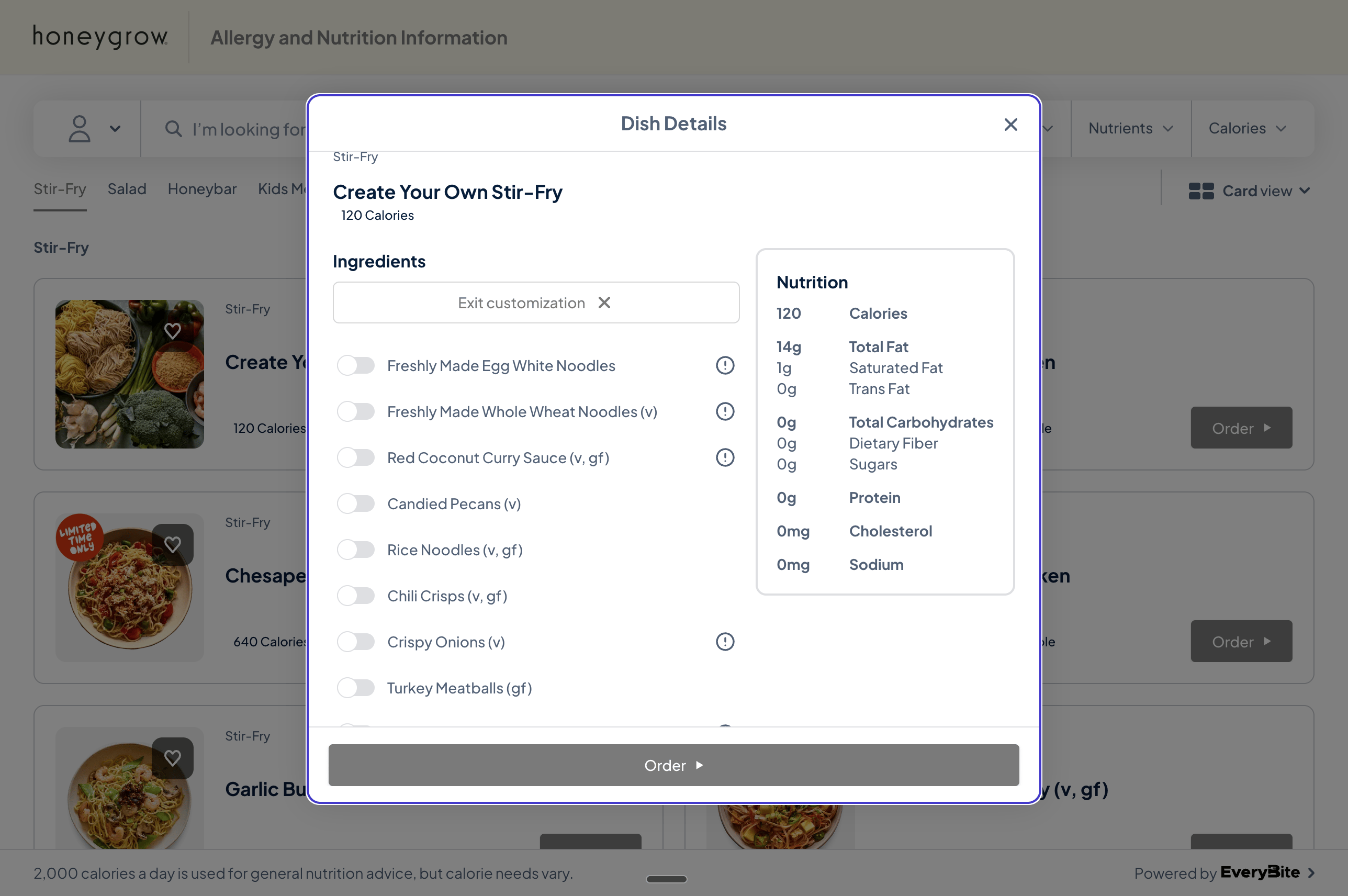
Many restaurants offer customizable dishes—build-your-own bowls, salads, pizzas, and more. When guests toggle ingredients on and off, they expect the nutrition panel and allergen warnings to update in real-time.
Dish customization interface showing ingredient toggles on the left and a nutrition panel on the right that updates as selections change
EveryBite provides two approaches for handling this:
ApproachBest ForTradeoffs
Calculate endpoint (recommended)Most integrationsSimple to implement, always accurate, requires API call per update
Client-side calculationOffline support, full controlYou implement the math, must handle updates when our data changes

Send the user’s selections to our API and receive calculated nutrition, allergens, and dietary flags. This is the recommended approach because:
  • No math required — We handle the calculations
  • Always accurate — Allergen and nutrition logic updates automatically
  • Consistent — Same results across all platforms using your integration

Get Customization Options

First, fetch the available customization options for a dish:
query DishCustomizations($dishId: ID!) {
  dish(id: $dishId) {
    id
    name
    isCustomizable
    customizationGroups {
      id
      name
      description
      selectionType        # SINGLE or MULTIPLE
      minSelections
      maxSelections
      options {
        id
        name
        isDefault
        isAvailable
        additionalPrice
        tags                # e.g., ["vegan", "gluten-free"]
      }
    }
  }
}

Calculate Nutrition for Selections

As the user toggles options, call the calculate mutation:
mutation CalculateCustomization($input: CalculateCustomizationInput!) {
  calculateCustomization(input: $input) {
    nutrition {
      calories
      fatTotal
      fatSaturated
      fatTrans
      cholesterol
      sodium
      carbohydrates
      dietaryFiber
      sugar
      protein
    }
    allergens {
      type
      displayName
      source
      confidence
    }
    dietaryFlags {
      type
      displayName
      qualifies
      reason
    }
    warnings
  }
}

Input

input CalculateCustomizationInput {
  dishId: ID!
  selectedOptions: [ID!]!
  guestId: ID                # Optional: include for preference matching
}

Parameters

ParameterTypeRequiredDescription
dishIdIDYesThe customizable dish ID
selectedOptions[ID!]!YesArray of selected customization option IDs
guestIdIDNoInclude to get preference match warnings

Example

mutation CalculateCustomization {
  calculateCustomization(input: {
    dishId: "dish_byo_001",
    selectedOptions: ["opt_rice_noodles", "opt_coconut_curry", "opt_tofu"]
  }) {
    nutrition {
      calories
      protein
      carbohydrates
      fatTotal
    }
    allergens {
      type
      displayName
      source
    }
    dietaryFlags {
      type
      displayName
      qualifies
    }
    warnings
  }
}

Performance Tips

The calculate endpoint is optimized for real-time use, but if you’re calling it on every toggle:
Debounce your requests. Wait 200-300ms after the user stops making changes before calling the API. This prevents unnecessary calls while they’re rapidly selecting options.
Example debounce pattern (JavaScript):
let debounceTimer;

function onSelectionChange(selectedOptions) {
  // Update UI optimistically if desired

  clearTimeout(debounceTimer);
  debounceTimer = setTimeout(() => {
    calculateCustomization(selectedOptions);
  }, 250);
}

Approach 2: Client-Side Calculation (Advanced)

For applications that need offline support or want full control over the calculation, you can request complete nutrition data for each customization option and calculate totals yourself.
With this approach, you’re responsible for:
  • Implementing nutrition summation logic
  • Handling allergen aggregation (including cross-contamination rules)
  • Determining dietary flag qualification
  • Updating your logic when our data model changes

Request Full Option Data

query DishWithFullCustomizations($dishId: ID!) {
  dish(id: $dishId) {
    id
    name
    baseNutrition {
      calories
      fatTotal
      fatSaturated
      fatTrans
      cholesterol
      sodium
      carbohydrates
      dietaryFiber
      sugar
      protein
    }
    baseAllergens {
      type
      displayName
      source
    }
    customizationGroups {
      id
      name
      selectionType
      options {
        id
        name
        isDefault
        nutrition {
          calories
          fatTotal
          fatSaturated
          fatTrans
          cholesterol
          sodium
          carbohydrates
          dietaryFiber
          sugar
          protein
        }
        allergens {
          type
          displayName
        }
        dietaryTags
      }
    }
  }
}

Calculation Rules

If you implement client-side calculation, follow these rules:

Nutrition

Sum the values from all selected options plus the base nutrition (if any):
function calculateNutrition(baseNutrition, selectedOptions) {
  const totals = { ...baseNutrition };

  for (const option of selectedOptions) {
    for (const [key, value] of Object.entries(option.nutrition)) {
      totals[key] = (totals[key] || 0) + (value || 0);
    }
  }

  return totals;
}

Allergens

Combine allergens from all selected options, deduplicating by type:
function aggregateAllergens(baseAllergens, selectedOptions) {
  const allergenMap = new Map();

  // Add base allergens
  for (const allergen of baseAllergens) {
    allergenMap.set(allergen.type, allergen);
  }

  // Add option allergens
  for (const option of selectedOptions) {
    for (const allergen of option.allergens) {
      if (!allergenMap.has(allergen.type)) {
        allergenMap.set(allergen.type, {
          ...allergen,
          source: option.name
        });
      }
    }
  }

  return Array.from(allergenMap.values());
}

Dietary Flags

A dish qualifies for a dietary flag only if all selected options qualify:
function checkDietaryFlag(flag, selectedOptions) {
  return selectedOptions.every(option =>
    option.dietaryTags.includes(flag)
  );
}
Dietary flag logic can be more complex than simple intersection. For example, a dish might be “vegan” only if it contains no animal products AND meets certain preparation requirements. The calculate endpoint handles these nuances automatically.

Which Approach Should I Use?

Use Calculate Endpoint

  • Building a web or mobile app with connectivity
  • Want simplest integration path
  • Need guaranteed accuracy for allergen/dietary info
  • Don’t want to maintain calculation logic

Use Client-Side Calculation

  • Building an offline-first application
  • Need instant updates without any network latency
  • Have specific UX requirements that need full control
  • Willing to maintain calculation logic
Most developers choose the calculate endpoint. It’s simpler to implement and ensures your users always see accurate information, even as our nutrition data and dietary classification rules evolve.


Response Types

CustomizationGroup

type CustomizationGroup {
  id: ID!
  name: String!
  description: String
  selectionType: SelectionType!
  minSelections: Int
  maxSelections: Int
  options: [CustomizationOption!]!
}

enum SelectionType {
  SINGLE      # Radio button - pick one
  MULTIPLE    # Checkboxes - pick many
}

CustomizationOption

type CustomizationOption {
  id: ID!
  name: String!
  isDefault: Boolean!
  isAvailable: Boolean!
  additionalPrice: Float
  tags: [String!]!
  nutrition: Nutrition          # Only with full data query
  allergens: [Allergen!]        # Only with full data query
  dietaryTags: [String!]        # Only with full data query
}

CalculationResult

type CalculationResult {
  nutrition: Nutrition!
  allergens: [Allergen!]!
  dietaryFlags: [DietaryFlag!]!
  warnings: [String!]!
}

type DietaryFlag {
  type: DietType!
  displayName: String!
  qualifies: Boolean!
  reason: String              # Explanation if doesn't qualify
}