> ## Documentation Index
> Fetch the complete documentation index at: https://docs.everybite.com/llms.txt
> Use this file to discover all available pages before exploring further.
# Match Status
> Understanding Match, Almost Match, and Not Match
When you query dishes with Guest Preferences, every dish receives a **Match Status** indicating how well it fits the guest's needs. This is a core feature that powers personalized menu experiences.
## The Three Statuses
Dish is fully compatible with all preferences as-is.
**UI:** Green indicator, show prominently
Dish can be modified to become compatible.
**UI:** Orange indicator, show with guidance
Dish contains excluded allergens or is incompatible.
**UI:** Red indicator or hidden, clear warning
## Match Status in Action
The SmartMenu shows match counts that update as filters change:
```
36 Match | 17 Partial Match | 24 Not a Match
```
## Understanding Each Status
### Match (Green)
The dish satisfies **all** of the guest's preferences:
* Compatible with all selected diets (Vegan, GlutenFree, etc.)
* Contains none of the excluded allergens
* Falls within nutrient ranges (calories, protein, etc.)
```graphql theme={null}
{
"dish": { "name": "Red Coconut Curry" },
"matchStatus": "MATCH",
"matchDetails": {
"dietCompatibility": ["Vegan", "GlutenFree"],
"allergenConflicts": [],
"nutrientsInRange": true
}
}
```
### Partial Match (Orange)
The dish **can be modified** to meet the guest's preferences. This typically means:
* It's a customizable dish (build-your-own)
* Certain ingredients can be removed or swapped
* With the right modifications, it becomes a full Match
```graphql theme={null}
{
"dish": { "name": "Pomegranate Acai Salad" },
"matchStatus": "ALMOST_MATCH",
"matchDetails": {
"dietCompatibility": ["Vegetarian"], # Not vegan due to feta
"allergenConflicts": ["Dairy"],
"modificationHints": [
{
"action": "REMOVE",
"ingredient": "Feta Cheese",
"reason": "Contains Dairy",
"resultingStatus": "MATCH"
}
]
}
}
```
**Partial Match is powerful UX.** Instead of hiding dishes, show guests how to make them work: "Remove Feta Cheese to make this dairy-free."
### Not a Match (Red)
The dish **cannot be made compatible**:
* Contains an excluded allergen that can't be removed
* Fundamentally incompatible with the diet (e.g., steak for a vegan)
* Core ingredients conflict with preferences
```graphql theme={null}
{
"dish": { "name": "Garlic Butter Shrimp" },
"matchStatus": "NOT_MATCH",
"matchDetails": {
"dietCompatibility": [],
"allergenConflicts": ["Shellfish", "Dairy"],
"canBeModified": false,
"reason": "Core ingredient (shrimp) contains Shellfish allergen"
}
}
```
### Unknown Match
In some cases, the system can't determine compatibility:
* Missing allergen data for the dish
* Customizable dish where compatibility depends on selections
```graphql theme={null}
{
"dish": { "name": "Create Your Own Stir-Fry" },
"matchStatus": "UNKNOWN",
"matchDetails": {
"reason": "Compatibility depends on ingredient selections"
}
}
```
## Querying with Match Status
### Get Search Results with Match Info
```graphql theme={null}
query {
search(
preferences: {
diets: [VEGETARIAN]
excludeAllergens: [DAIRY]
}
) {
matches {
dish {
id
name
nutrition { calories }
}
matchStatus
matchReasons
}
counts {
matches
almostMatches
notMatches
total
}
}
}
```
### Filter by Match Status
Only show matches:
```typescript theme={null}
const onlyMatches = results.matches.filter(
(result) => result.matchStatus === 'MATCH'
);
```
Or matches and almost matches:
```typescript theme={null}
const matchesAndAlmost = [
...results.matches,
...results.almostMatches,
].filter(
(result) =>
result.matchStatus === 'MATCH' ||
result.matchStatus === 'ALMOST_MATCH'
);
```
## Match Status for Customizable Dishes
For build-your-own dishes, match status **updates in real-time** as the guest makes selections:
```graphql theme={null}
# Initial query - status is UNKNOWN
{
"dish": { "name": "Create Your Own Stir-Fry" },
"matchStatus": "UNKNOWN"
}
# After selecting "Brown Rice (v, gf)" as base
{
"dish": { "name": "Create Your Own Stir-Fry" },
"matchStatus": "MATCH",
"selections": [
{ "category": "Base", "item": "Brown Rice", "diets": ["Vegan", "GlutenFree"] }
]
}
# After selecting "Freshly Made Egg White Noodles" instead
{
"dish": { "name": "Create Your Own Stir-Fry" },
"matchStatus": "ALMOST_MATCH", # Contains egg
"allergenConflicts": ["Egg"]
}
```
Use the [Customization Endpoint](/api/smartmenu/endpoints/customization) to recalculate match status as selections change.
## Displaying Match Status
### Visual Indicators
| Status | Color | Icon | Badge Text |
| ------------ | ---------------- | ------------- | -------------- |
| Match | Green (#22C55E) | Checkmark | "Match" |
| Almost Match | Orange (#F59E0B) | Half-circle | "Almost Match" |
| Not Match | Red (#EF4444) | X mark | "Not Match" |
| Unknown | Gray (#6B7280) | Question mark | "Unknown" |
### Match Summary Bar
Show aggregate counts at the top of results:
```jsx theme={null}
{counts.matches} Match{counts.partialMatches} Partial Match{counts.notAMatch} Not a Match
```
### Modification Hints UI
For Partial Matches, show actionable guidance:
```jsx theme={null}
{matchStatus === 'ALMOST_MATCH' && (
Make this dish work for you:
{modificationHints.map(hint => (
))}
)}
```
## Best Practices
Don't hide incompatible dishes completely. Guests may be ordering for a group or might want to know what they're missing. Show them with clear warnings.
Don't just show orange. Tell the guest exactly what to change: "Remove Feta to make dairy-free." This turns a near-miss into a win.
As guests adjust filters, update the match summary immediately. This gives feedback that their filters are working.
For customizable dishes, show "Match depends on your selections" rather than leaving guests confused.
## Next Steps
Build advanced filtering UIs
Handle customizable dishes
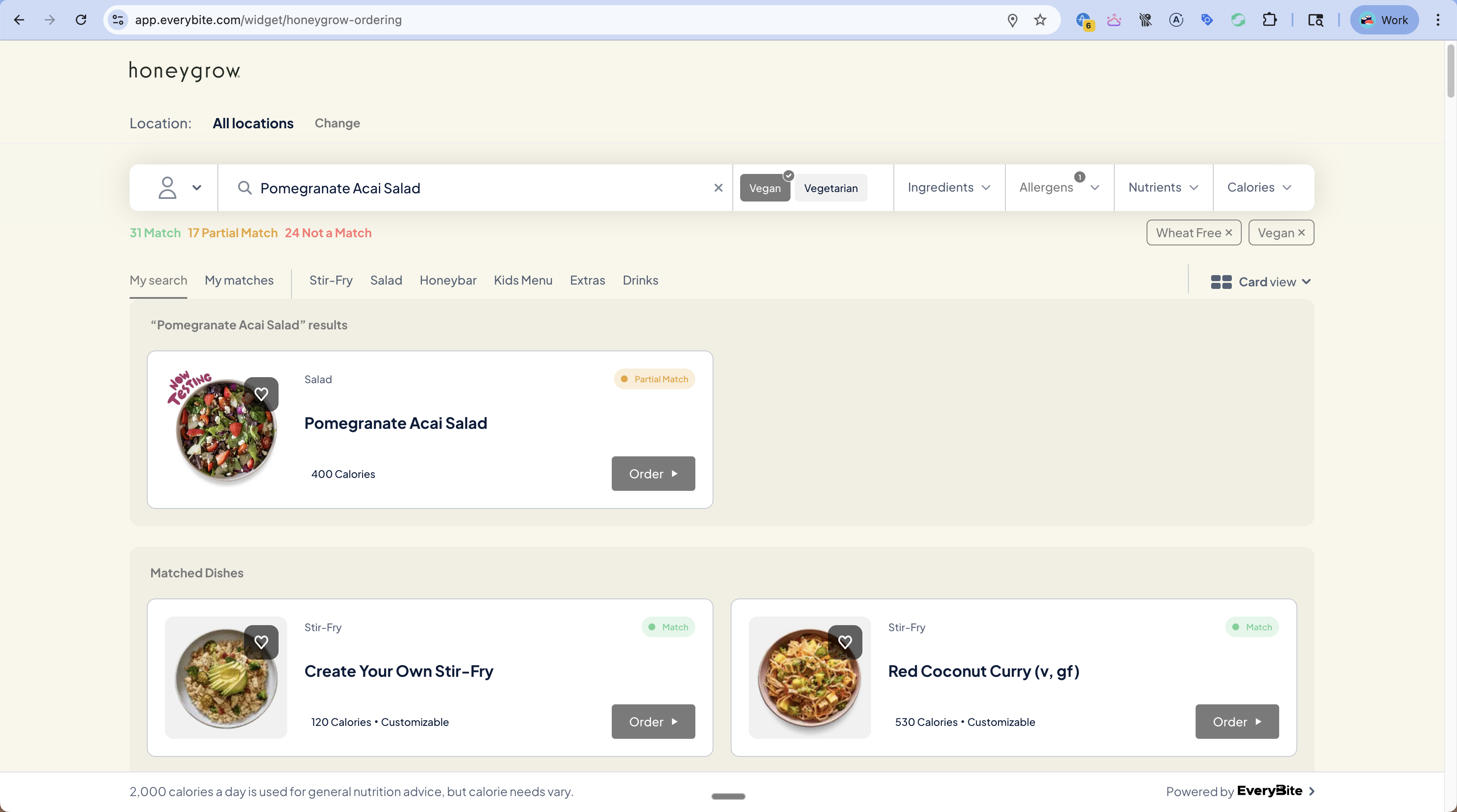 The SmartMenu shows match counts that update as filters change:
```
36 Match | 17 Partial Match | 24 Not a Match
```
## Understanding Each Status
### Match (Green)
The dish satisfies **all** of the guest's preferences:
* Compatible with all selected diets (Vegan, GlutenFree, etc.)
* Contains none of the excluded allergens
* Falls within nutrient ranges (calories, protein, etc.)
```graphql theme={null}
{
"dish": { "name": "Red Coconut Curry" },
"matchStatus": "MATCH",
"matchDetails": {
"dietCompatibility": ["Vegan", "GlutenFree"],
"allergenConflicts": [],
"nutrientsInRange": true
}
}
```
### Partial Match (Orange)
The dish **can be modified** to meet the guest's preferences. This typically means:
* It's a customizable dish (build-your-own)
* Certain ingredients can be removed or swapped
* With the right modifications, it becomes a full Match
```graphql theme={null}
{
"dish": { "name": "Pomegranate Acai Salad" },
"matchStatus": "ALMOST_MATCH",
"matchDetails": {
"dietCompatibility": ["Vegetarian"], # Not vegan due to feta
"allergenConflicts": ["Dairy"],
"modificationHints": [
{
"action": "REMOVE",
"ingredient": "Feta Cheese",
"reason": "Contains Dairy",
"resultingStatus": "MATCH"
}
]
}
}
```
The SmartMenu shows match counts that update as filters change:
```
36 Match | 17 Partial Match | 24 Not a Match
```
## Understanding Each Status
### Match (Green)
The dish satisfies **all** of the guest's preferences:
* Compatible with all selected diets (Vegan, GlutenFree, etc.)
* Contains none of the excluded allergens
* Falls within nutrient ranges (calories, protein, etc.)
```graphql theme={null}
{
"dish": { "name": "Red Coconut Curry" },
"matchStatus": "MATCH",
"matchDetails": {
"dietCompatibility": ["Vegan", "GlutenFree"],
"allergenConflicts": [],
"nutrientsInRange": true
}
}
```
### Partial Match (Orange)
The dish **can be modified** to meet the guest's preferences. This typically means:
* It's a customizable dish (build-your-own)
* Certain ingredients can be removed or swapped
* With the right modifications, it becomes a full Match
```graphql theme={null}
{
"dish": { "name": "Pomegranate Acai Salad" },
"matchStatus": "ALMOST_MATCH",
"matchDetails": {
"dietCompatibility": ["Vegetarian"], # Not vegan due to feta
"allergenConflicts": ["Dairy"],
"modificationHints": [
{
"action": "REMOVE",
"ingredient": "Feta Cheese",
"reason": "Contains Dairy",
"resultingStatus": "MATCH"
}
]
}
}
```
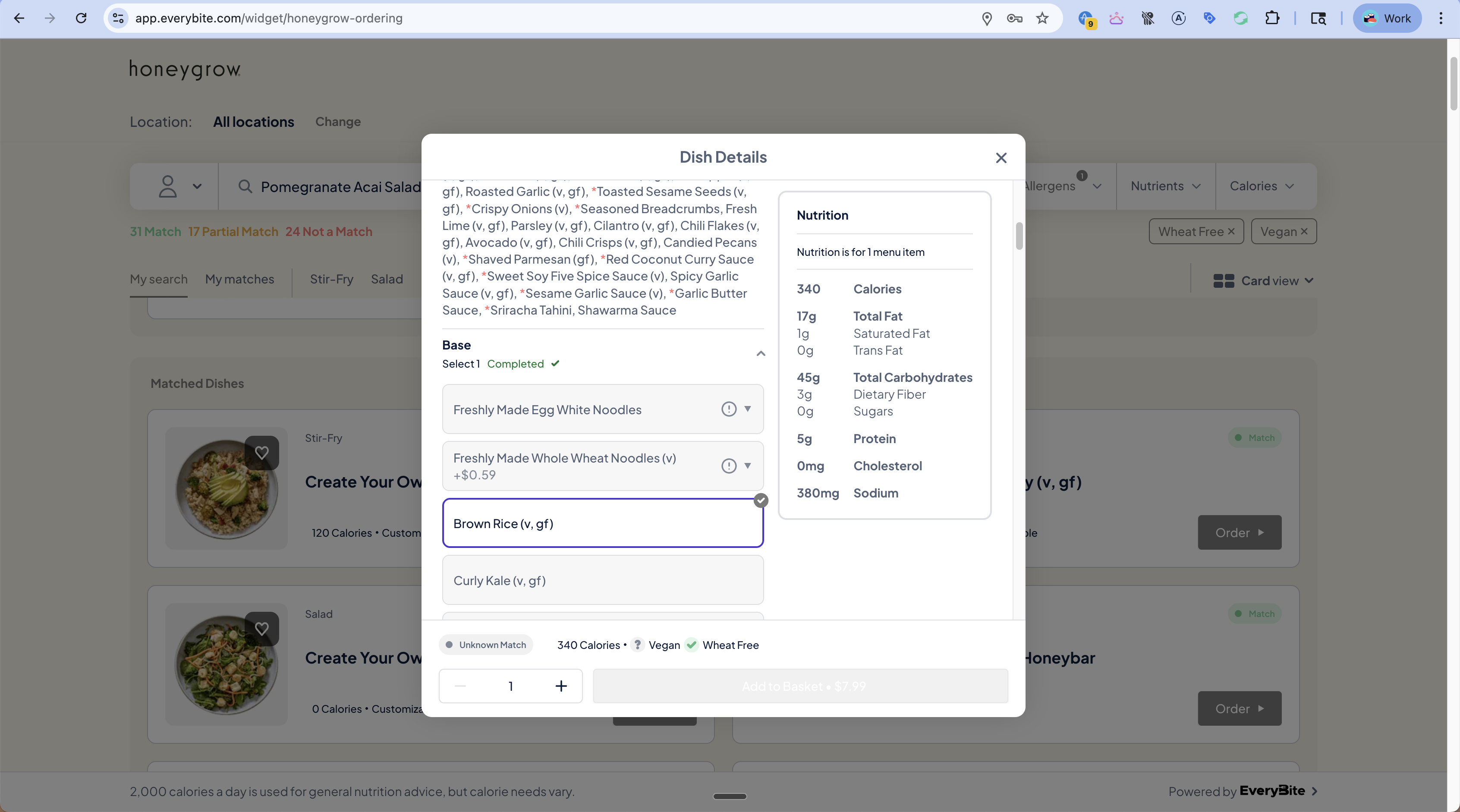 ```graphql theme={null}
# Initial query - status is UNKNOWN
{
"dish": { "name": "Create Your Own Stir-Fry" },
"matchStatus": "UNKNOWN"
}
# After selecting "Brown Rice (v, gf)" as base
{
"dish": { "name": "Create Your Own Stir-Fry" },
"matchStatus": "MATCH",
"selections": [
{ "category": "Base", "item": "Brown Rice", "diets": ["Vegan", "GlutenFree"] }
]
}
# After selecting "Freshly Made Egg White Noodles" instead
{
"dish": { "name": "Create Your Own Stir-Fry" },
"matchStatus": "ALMOST_MATCH", # Contains egg
"allergenConflicts": ["Egg"]
}
```
Use the [Customization Endpoint](/api/smartmenu/endpoints/customization) to recalculate match status as selections change.
## Displaying Match Status
### Visual Indicators
| Status | Color | Icon | Badge Text |
| ------------ | ---------------- | ------------- | -------------- |
| Match | Green (#22C55E) | Checkmark | "Match" |
| Almost Match | Orange (#F59E0B) | Half-circle | "Almost Match" |
| Not Match | Red (#EF4444) | X mark | "Not Match" |
| Unknown | Gray (#6B7280) | Question mark | "Unknown" |
### Match Summary Bar
Show aggregate counts at the top of results:
```jsx theme={null}
```graphql theme={null}
# Initial query - status is UNKNOWN
{
"dish": { "name": "Create Your Own Stir-Fry" },
"matchStatus": "UNKNOWN"
}
# After selecting "Brown Rice (v, gf)" as base
{
"dish": { "name": "Create Your Own Stir-Fry" },
"matchStatus": "MATCH",
"selections": [
{ "category": "Base", "item": "Brown Rice", "diets": ["Vegan", "GlutenFree"] }
]
}
# After selecting "Freshly Made Egg White Noodles" instead
{
"dish": { "name": "Create Your Own Stir-Fry" },
"matchStatus": "ALMOST_MATCH", # Contains egg
"allergenConflicts": ["Egg"]
}
```
Use the [Customization Endpoint](/api/smartmenu/endpoints/customization) to recalculate match status as selections change.
## Displaying Match Status
### Visual Indicators
| Status | Color | Icon | Badge Text |
| ------------ | ---------------- | ------------- | -------------- |
| Match | Green (#22C55E) | Checkmark | "Match" |
| Almost Match | Orange (#F59E0B) | Half-circle | "Almost Match" |
| Not Match | Red (#EF4444) | X mark | "Not Match" |
| Unknown | Gray (#6B7280) | Question mark | "Unknown" |
### Match Summary Bar
Show aggregate counts at the top of results:
```jsx theme={null}