> ## Documentation Index
> Fetch the complete documentation index at: https://docs.everybite.com/llms.txt
> Use this file to discover all available pages before exploring further.
# Customization
> Handle Build-Your-Own dishes with real-time nutrition calculations
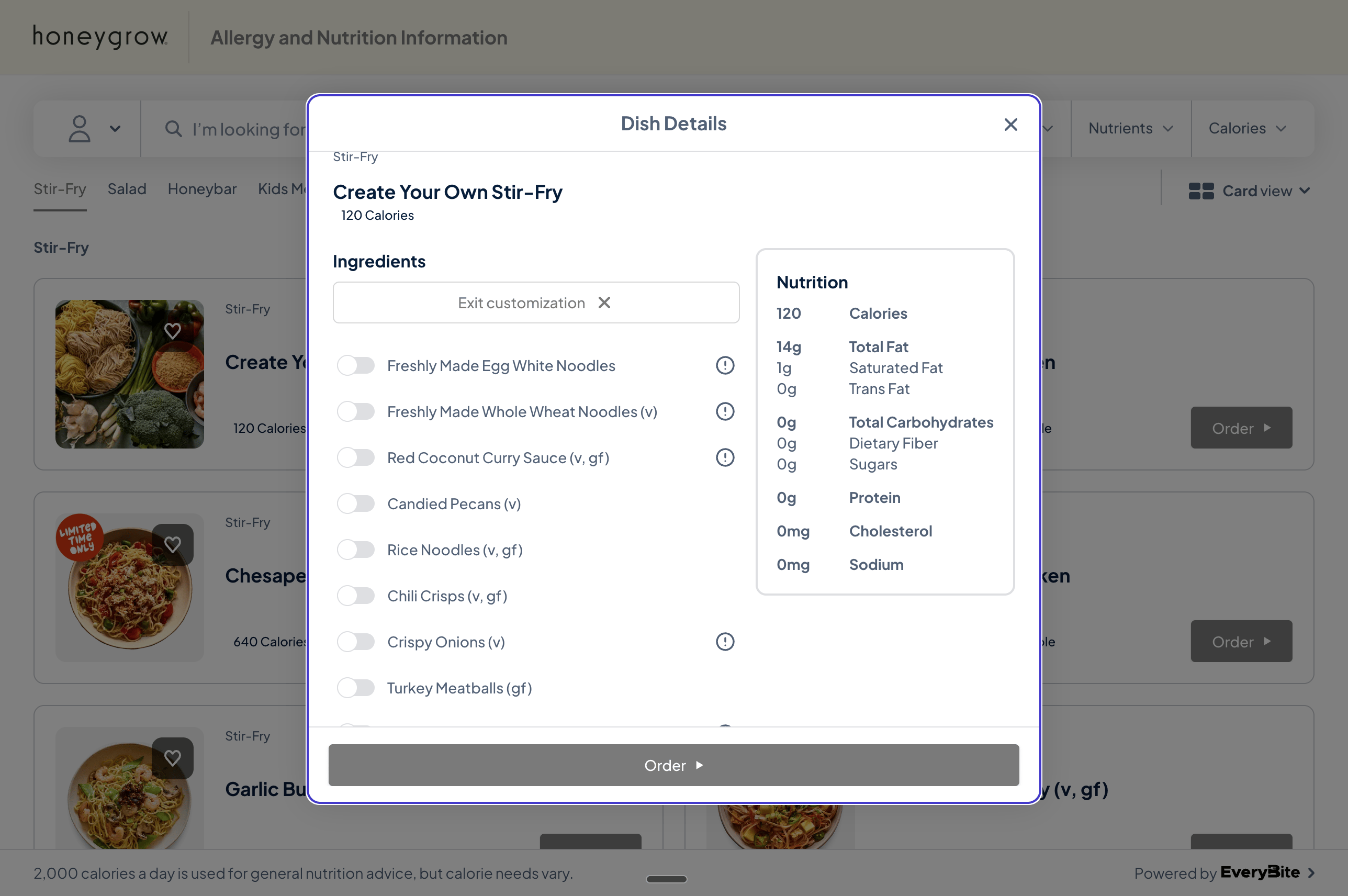
Many restaurants offer customizable dishes—build-your-own bowls, salads, pizzas, and more. When guests toggle ingredients on and off, they expect the nutrition panel and allergen warnings to update in real-time.
 EveryBite provides two approaches for handling this:
| Approach | Best For | Tradeoffs |
| ------------------------------------ | ----------------------------- | ------------------------------------------------------------------ |
| **Calculate endpoint** (recommended) | Most integrations | Simple to implement, always accurate, requires API call per update |
| **Client-side calculation** | Offline support, full control | You implement the math, must handle updates when our data changes |
***
## Approach 1: Calculate Endpoint (Recommended)
Send the user's selections to our API and receive calculated nutrition and allergens. This is the recommended approach because:
* **No math required** — We handle the calculations
* **Always accurate** — Allergen and nutrition logic updates automatically
* **Consistent** — Same results across all platforms using your integration
### Get Customization Options
First, fetch the available ingredients for a customizable dish:
```graphql theme={null}
query DishIngredients($dishId: ID!) {
dish(id: $dishId) {
id
name
isCustomizable
addedIngredients {
id
name
isIncluded # Whether this ingredient is part of the default dish
isKeyIngredient # Whether this ingredient is part of the default selection when none are provided
quantity
unit
amountGrams
containsEgg
containsFish
containsMilk
containsSesame
containsShellfish
containsWheat
containsPeanut
containsSoy
containsTreeNut
}
}
}
```
### Calculate Nutrition for Selections
As the user toggles ingredients on and off, call the `calculate` query:
```graphql theme={null}
query CalculateNutrition {
calculate(
dishId: "DISH_ID"
selectedOptions: ["INGREDIENT_ID_1", "INGREDIENT_ID_2", "INGREDIENT_ID_3"]
) {
nutrition {
caloriesTotal
caloriesFromFat
fatTotal
fatSaturated
fatTrans
cholesterol
sodium
dietaryFiber
carbohydrates
sugar
protein
vitaminA
vitaminC
calcium
iron
}
allergens {
id
name
description
confidence
}
}
}
```
#### Input
```graphql theme={null}
calculate(
dishId: ID!
selectedOptions: [ID!]!
): CalculateResult!
```
#### Parameters
| Parameter | Type | Required | Description |
| ----------------- | ------- | -------- | ------------------------------------------------------------- |
| `dishId` | ID | Yes | The customizable dish ID |
| `selectedOptions` | \[ID!]! | Yes | Array of selected ingredient IDs for this dish. Can be empty. |
### Example
```graphql Query theme={null}
query CalculateNutrition {
calculate(
dishId: "dish_byo_001"
selectedOptions: ["INGREDIENT_ID_1", "INGREDIENT_ID_2", "INGREDIENT_ID_3"]
) {
nutrition {
caloriesTotal
protein
carbohydrates
fatTotal
}
allergens {
id
name
description
confidence
}
}
}
```
```json Response theme={null}
{
"data": {
"calculate": {
"nutrition": {
"caloriesTotal": 485,
"protein": 18,
"carbohydrates": 52,
"fatTotal": 22
},
"allergens": [
{
"id": "allergen_soy",
"name": "Soy",
"description": "Contains soy-based ingredients",
"confidence": 0.98
},
{
"id": "allergen_tree_nut",
"name": "Tree Nut",
"description": "Contains tree nuts",
"confidence": 0.97
}
]
}
}
}
```
### Performance Tips
The calculate endpoint is optimized for real-time use, but if you're calling it on every toggle:
**Debounce your requests.** Wait 200-300ms after the user stops making changes before calling the API. This prevents unnecessary calls while they're rapidly selecting options.
Example debounce pattern (JavaScript):
```javascript theme={null}
let debounceTimer;
function onSelectionChange(selectedOptions) {
// Update UI optimistically if desired
clearTimeout(debounceTimer);
debounceTimer = setTimeout(() => {
calculateCustomization(selectedOptions);
}, 250);
}
```
***
## Approach 2: Client-Side Calculation (Advanced)
For applications that need offline support or want full control over the calculation, you can request complete nutrition data for each customization option and calculate totals yourself.
With this approach, you're responsible for:
* Implementing nutrition summation logic
* Handling allergen aggregation (including cross-contamination rules)
* Determining dietary flag qualification
* Updating your logic when our data model changes
### Request Full Option Data
```graphql theme={null}
query DishWithFullCustomizations($dishId: ID!) {
dish(id: $dishId) {
id
name
baseNutrition {
calories
fatTotal
fatSaturated
fatTrans
cholesterol
sodium
carbohydrates
dietaryFiber
sugar
protein
}
baseAllergens {
type
displayName
source
}
customizationGroups {
id
name
chainModifierId
selectionType
options {
id
name
chainOptionId
isDefault
nutrition {
calories
fatTotal
fatSaturated
fatTrans
cholesterol
sodium
carbohydrates
dietaryFiber
sugar
protein
}
allergens {
type
displayName
}
dietaryTags
}
}
}
}
```
### Calculation Rules
If you implement client-side calculation, follow these rules:
#### Nutrition
Sum the values from all selected options plus the base nutrition (if any):
```javascript theme={null}
function calculateNutrition(baseNutrition, selectedOptions) {
const totals = { ...baseNutrition };
for (const option of selectedOptions) {
for (const [key, value] of Object.entries(option.nutrition)) {
totals[key] = (totals[key] || 0) + (value || 0);
}
}
return totals;
}
```
#### Allergens
Combine allergens from all selected options, deduplicating by type:
```javascript theme={null}
function aggregateAllergens(baseAllergens, selectedOptions) {
const allergenMap = new Map();
// Add base allergens
for (const allergen of baseAllergens) {
allergenMap.set(allergen.type, allergen);
}
// Add option allergens
for (const option of selectedOptions) {
for (const allergen of option.allergens) {
if (!allergenMap.has(allergen.type)) {
allergenMap.set(allergen.type, {
...allergen,
source: option.name
});
}
}
}
return Array.from(allergenMap.values());
}
```
#### Dietary Flags
A dish qualifies for a dietary flag only if **all** selected options qualify:
```javascript theme={null}
function checkDietaryFlag(flag, selectedOptions) {
return selectedOptions.every(option =>
option.dietaryTags.includes(flag)
);
}
```
Dietary flag logic can be more complex than simple intersection. For example, a dish might be "vegan" only if it contains no animal products AND meets certain preparation requirements. The calculate endpoint handles these nuances automatically.
***
## Which Approach Should I Use?
* Building a web or mobile app with connectivity
* Want simplest integration path
* Need guaranteed accuracy for allergen/dietary info
* Don't want to maintain calculation logic
* Building an offline-first application
* Need instant updates without any network latency
* Have specific UX requirements that need full control
* Willing to maintain calculation logic
Most developers choose the calculate endpoint. It's simpler to implement and ensures your users always see accurate information, even as our nutrition data and dietary classification rules evolve.
***
## Response Types
### CustomizationGroup
A modifier group associated with a customizable dish (e.g. "Choose your sauce").
```graphql theme={null}
type CustomizationGroup {
id: ID!
name: String!
chainModifierId: String
selectionType: String!
options: [CustomizationOption!]!
}
```
| Field | Type | Description |
| ----------------- | ------------------------ | -------------------------------------------------------------------------------------------------------- |
| `id` | ID! | Location-specific modifier group identifier |
| `name` | String! | Group name shown to the guest |
| `chainModifierId` | String | Read-only. OLO global modifier group ID — identical for the same group across all locations in the chain |
| `selectionType` | String! | Selection behaviour (e.g. `single`, `multiple`) |
| `options` | \[CustomizationOption!]! | Selectable options within this group |
### CustomizationOption
A single selectable option within a customization group.
```graphql theme={null}
type CustomizationOption {
id: ID!
name: String!
chainOptionId: String
isDefault: Boolean!
nutrition: OptionNutrition
allergens: [OptionAllergen!]!
dietaryTags: [String!]!
}
```
| Field | Type | Description |
| --------------- | ------------------- | ------------------------------------------------------------------------------------------------- |
| `id` | ID! | Location-specific option identifier |
| `name` | String! | Option name shown to the guest |
| `chainOptionId` | String | Read-only. OLO global option ID — identical for the same option across all locations in the chain |
| `isDefault` | Boolean! | Whether this option is selected by default |
| `nutrition` | OptionNutrition | Nutrition delta for this option |
| `allergens` | \[OptionAllergen!]! | Allergens introduced by this option |
| `dietaryTags` | \[String!]! | Dietary tags for this option |
### Ingredient
```graphql theme={null}
type Ingredient {
id: ID!
name: String!
brand: String
description: String
supplier: String
caloriesTotalPer100g: String
caloriesFromFatPer100g: String
fatTotalPer100g: String
fatSaturatedPer100g: String
fatTransPer100g: String
cholesterolPer100g: String
carbohydratesPer100g: String
sugarPer100g: String
proteinPer100g: String
vitaminAPer100g: String
vitaminCPer100g: String
calciumPer100g: String
ironPer100g: String
containsEgg: Boolean
containsFish: Boolean
containsMilk: Boolean
containsSesame: Boolean
containsShellfish: Boolean
containsWheat: Boolean
containsPeanut: Boolean
containsSoy: Boolean
containsTreeNut: Boolean
isIncluded: Boolean!
isKeyIngredient: Boolean!
quantity: String!
unit: String!
amountGrams: Float!
}
```
### CalculatedNutrition
```graphql theme={null}
type CalculatedNutrition {
caloriesTotal: Float!
caloriesFromFat: Float!
fatTotal: Float!
fatSaturated: Float!
fatTrans: Float!
cholesterol: Float!
sodium: Float!
dietaryFiber: Float!
carbohydrates: Float!
sugar: Float!
protein: Float!
vitaminA: Float!
vitaminC: Float!
calcium: Float!
iron: Float!
}
```
### CalculateResult
```graphql theme={null}
type CalculateResult {
nutrition: CalculatedNutrition!
allergens: [Allergen!]!
}
```
EveryBite provides two approaches for handling this:
| Approach | Best For | Tradeoffs |
| ------------------------------------ | ----------------------------- | ------------------------------------------------------------------ |
| **Calculate endpoint** (recommended) | Most integrations | Simple to implement, always accurate, requires API call per update |
| **Client-side calculation** | Offline support, full control | You implement the math, must handle updates when our data changes |
***
## Approach 1: Calculate Endpoint (Recommended)
Send the user's selections to our API and receive calculated nutrition and allergens. This is the recommended approach because:
* **No math required** — We handle the calculations
* **Always accurate** — Allergen and nutrition logic updates automatically
* **Consistent** — Same results across all platforms using your integration
### Get Customization Options
First, fetch the available ingredients for a customizable dish:
```graphql theme={null}
query DishIngredients($dishId: ID!) {
dish(id: $dishId) {
id
name
isCustomizable
addedIngredients {
id
name
isIncluded # Whether this ingredient is part of the default dish
isKeyIngredient # Whether this ingredient is part of the default selection when none are provided
quantity
unit
amountGrams
containsEgg
containsFish
containsMilk
containsSesame
containsShellfish
containsWheat
containsPeanut
containsSoy
containsTreeNut
}
}
}
```
### Calculate Nutrition for Selections
As the user toggles ingredients on and off, call the `calculate` query:
```graphql theme={null}
query CalculateNutrition {
calculate(
dishId: "DISH_ID"
selectedOptions: ["INGREDIENT_ID_1", "INGREDIENT_ID_2", "INGREDIENT_ID_3"]
) {
nutrition {
caloriesTotal
caloriesFromFat
fatTotal
fatSaturated
fatTrans
cholesterol
sodium
dietaryFiber
carbohydrates
sugar
protein
vitaminA
vitaminC
calcium
iron
}
allergens {
id
name
description
confidence
}
}
}
```
#### Input
```graphql theme={null}
calculate(
dishId: ID!
selectedOptions: [ID!]!
): CalculateResult!
```
#### Parameters
| Parameter | Type | Required | Description |
| ----------------- | ------- | -------- | ------------------------------------------------------------- |
| `dishId` | ID | Yes | The customizable dish ID |
| `selectedOptions` | \[ID!]! | Yes | Array of selected ingredient IDs for this dish. Can be empty. |
### Example
```graphql Query theme={null}
query CalculateNutrition {
calculate(
dishId: "dish_byo_001"
selectedOptions: ["INGREDIENT_ID_1", "INGREDIENT_ID_2", "INGREDIENT_ID_3"]
) {
nutrition {
caloriesTotal
protein
carbohydrates
fatTotal
}
allergens {
id
name
description
confidence
}
}
}
```
```json Response theme={null}
{
"data": {
"calculate": {
"nutrition": {
"caloriesTotal": 485,
"protein": 18,
"carbohydrates": 52,
"fatTotal": 22
},
"allergens": [
{
"id": "allergen_soy",
"name": "Soy",
"description": "Contains soy-based ingredients",
"confidence": 0.98
},
{
"id": "allergen_tree_nut",
"name": "Tree Nut",
"description": "Contains tree nuts",
"confidence": 0.97
}
]
}
}
}
```
### Performance Tips
The calculate endpoint is optimized for real-time use, but if you're calling it on every toggle:
**Debounce your requests.** Wait 200-300ms after the user stops making changes before calling the API. This prevents unnecessary calls while they're rapidly selecting options.
Example debounce pattern (JavaScript):
```javascript theme={null}
let debounceTimer;
function onSelectionChange(selectedOptions) {
// Update UI optimistically if desired
clearTimeout(debounceTimer);
debounceTimer = setTimeout(() => {
calculateCustomization(selectedOptions);
}, 250);
}
```
***
## Approach 2: Client-Side Calculation (Advanced)
For applications that need offline support or want full control over the calculation, you can request complete nutrition data for each customization option and calculate totals yourself.
With this approach, you're responsible for:
* Implementing nutrition summation logic
* Handling allergen aggregation (including cross-contamination rules)
* Determining dietary flag qualification
* Updating your logic when our data model changes
### Request Full Option Data
```graphql theme={null}
query DishWithFullCustomizations($dishId: ID!) {
dish(id: $dishId) {
id
name
baseNutrition {
calories
fatTotal
fatSaturated
fatTrans
cholesterol
sodium
carbohydrates
dietaryFiber
sugar
protein
}
baseAllergens {
type
displayName
source
}
customizationGroups {
id
name
chainModifierId
selectionType
options {
id
name
chainOptionId
isDefault
nutrition {
calories
fatTotal
fatSaturated
fatTrans
cholesterol
sodium
carbohydrates
dietaryFiber
sugar
protein
}
allergens {
type
displayName
}
dietaryTags
}
}
}
}
```
### Calculation Rules
If you implement client-side calculation, follow these rules:
#### Nutrition
Sum the values from all selected options plus the base nutrition (if any):
```javascript theme={null}
function calculateNutrition(baseNutrition, selectedOptions) {
const totals = { ...baseNutrition };
for (const option of selectedOptions) {
for (const [key, value] of Object.entries(option.nutrition)) {
totals[key] = (totals[key] || 0) + (value || 0);
}
}
return totals;
}
```
#### Allergens
Combine allergens from all selected options, deduplicating by type:
```javascript theme={null}
function aggregateAllergens(baseAllergens, selectedOptions) {
const allergenMap = new Map();
// Add base allergens
for (const allergen of baseAllergens) {
allergenMap.set(allergen.type, allergen);
}
// Add option allergens
for (const option of selectedOptions) {
for (const allergen of option.allergens) {
if (!allergenMap.has(allergen.type)) {
allergenMap.set(allergen.type, {
...allergen,
source: option.name
});
}
}
}
return Array.from(allergenMap.values());
}
```
#### Dietary Flags
A dish qualifies for a dietary flag only if **all** selected options qualify:
```javascript theme={null}
function checkDietaryFlag(flag, selectedOptions) {
return selectedOptions.every(option =>
option.dietaryTags.includes(flag)
);
}
```
Dietary flag logic can be more complex than simple intersection. For example, a dish might be "vegan" only if it contains no animal products AND meets certain preparation requirements. The calculate endpoint handles these nuances automatically.
***
## Which Approach Should I Use?
* Building a web or mobile app with connectivity
* Want simplest integration path
* Need guaranteed accuracy for allergen/dietary info
* Don't want to maintain calculation logic
* Building an offline-first application
* Need instant updates without any network latency
* Have specific UX requirements that need full control
* Willing to maintain calculation logic
Most developers choose the calculate endpoint. It's simpler to implement and ensures your users always see accurate information, even as our nutrition data and dietary classification rules evolve.
***
## Response Types
### CustomizationGroup
A modifier group associated with a customizable dish (e.g. "Choose your sauce").
```graphql theme={null}
type CustomizationGroup {
id: ID!
name: String!
chainModifierId: String
selectionType: String!
options: [CustomizationOption!]!
}
```
| Field | Type | Description |
| ----------------- | ------------------------ | -------------------------------------------------------------------------------------------------------- |
| `id` | ID! | Location-specific modifier group identifier |
| `name` | String! | Group name shown to the guest |
| `chainModifierId` | String | Read-only. OLO global modifier group ID — identical for the same group across all locations in the chain |
| `selectionType` | String! | Selection behaviour (e.g. `single`, `multiple`) |
| `options` | \[CustomizationOption!]! | Selectable options within this group |
### CustomizationOption
A single selectable option within a customization group.
```graphql theme={null}
type CustomizationOption {
id: ID!
name: String!
chainOptionId: String
isDefault: Boolean!
nutrition: OptionNutrition
allergens: [OptionAllergen!]!
dietaryTags: [String!]!
}
```
| Field | Type | Description |
| --------------- | ------------------- | ------------------------------------------------------------------------------------------------- |
| `id` | ID! | Location-specific option identifier |
| `name` | String! | Option name shown to the guest |
| `chainOptionId` | String | Read-only. OLO global option ID — identical for the same option across all locations in the chain |
| `isDefault` | Boolean! | Whether this option is selected by default |
| `nutrition` | OptionNutrition | Nutrition delta for this option |
| `allergens` | \[OptionAllergen!]! | Allergens introduced by this option |
| `dietaryTags` | \[String!]! | Dietary tags for this option |
### Ingredient
```graphql theme={null}
type Ingredient {
id: ID!
name: String!
brand: String
description: String
supplier: String
caloriesTotalPer100g: String
caloriesFromFatPer100g: String
fatTotalPer100g: String
fatSaturatedPer100g: String
fatTransPer100g: String
cholesterolPer100g: String
carbohydratesPer100g: String
sugarPer100g: String
proteinPer100g: String
vitaminAPer100g: String
vitaminCPer100g: String
calciumPer100g: String
ironPer100g: String
containsEgg: Boolean
containsFish: Boolean
containsMilk: Boolean
containsSesame: Boolean
containsShellfish: Boolean
containsWheat: Boolean
containsPeanut: Boolean
containsSoy: Boolean
containsTreeNut: Boolean
isIncluded: Boolean!
isKeyIngredient: Boolean!
quantity: String!
unit: String!
amountGrams: Float!
}
```
### CalculatedNutrition
```graphql theme={null}
type CalculatedNutrition {
caloriesTotal: Float!
caloriesFromFat: Float!
fatTotal: Float!
fatSaturated: Float!
fatTrans: Float!
cholesterol: Float!
sodium: Float!
dietaryFiber: Float!
carbohydrates: Float!
sugar: Float!
protein: Float!
vitaminA: Float!
vitaminC: Float!
calcium: Float!
iron: Float!
}
```
### CalculateResult
```graphql theme={null}
type CalculateResult {
nutrition: CalculatedNutrition!
allergens: [Allergen!]!
}
```